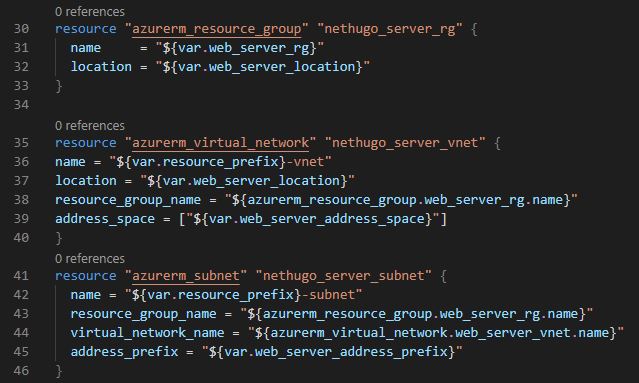
Similar to all other programming languages, Terraform also makes use of variables for dynamic coding.
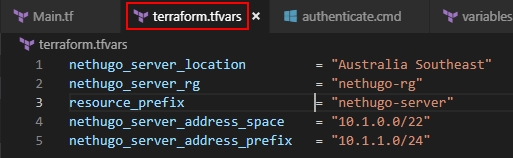
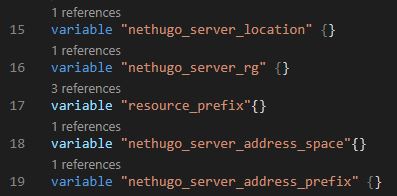
You can have a dedicated Terraform variables file with extension .TFVARS within your working directory/folder and this will automatically be referenced in your main Terraform code file, so you can call directly and/or interpolate.
There are several different types of variables in Terraform;
- String; Name objects or any methods requiring simple text.
- Map; Defining Azure location/region methods.
- List; Defining Azure Subnets or IP address methods. Lists are essentially arrays, for those familiar with programming syntax, ie. [ ].
- Boolean; Defining True/False methods. Bear in mind, in Terraform type is still defined as String.
String
variable "server_name {
 default = "nethugo-server"
}
Map
variable "locations" {
 type = "map"
 default = {
  location1 = "Australia Southeast"
  location2 = "westus2"
  }
}
List
variable "subnets" {
 type = "list"
 default = ["10.0.1.10", "10.0.1.11"]
}
Boolean
variable "status" {
 type = "string"
 default = false
}
Calling Variables
We can call above variables with the following. Ensure you include quotes.
- String; “${var.server_name}”
- Output: nethugo-server
- Map: “${var.locations[“location1″]}”
- Output: Australia Southeast
- List: “${var.subnets[0]}”
- Output: 10.0.1.10
- Boolean: “${var.status}”
- Output: false
Examples
.TFVARS variables
Initialising TFVARS variables in Main .TF file
Calling TFVARS variables in Main .TF file